-
Get to know DEZ TV
-
What is DEZ TV?

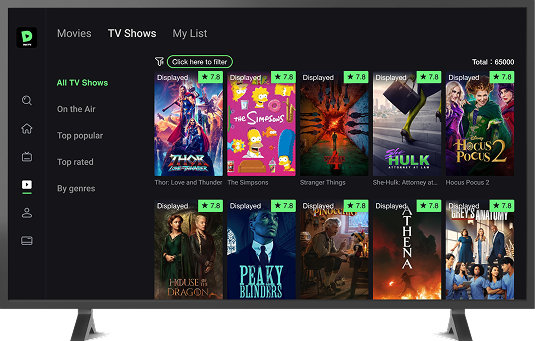
DEZ TV is a Live TV & VOD app, available for Android devices, with more than 100,000+ movies & series and 160+ channels, including the best in sports, news, and entertainment.
The app is compatible with:
· Android smartphones.
· Android TV BOX.
· Android TV
· TV Stick.
-
How do I download and install DEZ TV?
Mobile:
1. Access the Download Link: https://deztv.com/#Download
2. Install the App after the download is complete, you can find the APK file in your device`s "Downloads" folder and click "Install".
Note: If you see a Google Security pop-up saying "The app is harmful", follow these steps to install the app:
1. Tap "More details."
2. Tap "Install anyway."
3. Do not tap "Got it" to ensure the app installs successfully.
TV/ TV Box/ TV Stick:
1. Access the Play Store and download the app "Downloader by AFTVnews"
2. Go to settings > security & restrictions > enable apps from unknown sources.
3. Open "Downloader by AFTVnews" and type or 5617716 to install the App.
Note: If your TV is not an android TV, you can use a TV Box / TV stick.
-
Is there a free trial?
We offer a 7-day free trial for a new device registered. Please make sure that the device has not been activated the DEZ app before.
-
How to register or create a DEZ TV account?
You can register in two ways: with an email or phone number directly from the app.
Steps to register:
1. Enter your email address or mobile phone and click on the "Send code" button.
2. Now access your account and copy the 4-digit code we sent to you (remember to check your email or message).
3. Return to the registration page and paste the code in the "4-digit code" field.
4. Create a password.
5. Click "Submit".
Ready! Welcome to the DEZ TV family!
-
Possible issues from Download and account registration
-
I did not receive the verification code.
To recover your password or create a new account, check your "Spam" folder after clicking "Send code" to receive the verification code, as it may be marked as spam by your email provider.
-
How to reset my DEZ TV password?
To recover your password, please follow the following steps:
Website
1. Access: https://deztv.vip/forgot-password
2. Select your account type (e-mail or phone).
3. Click “Send code” to receive a 4-digit verification code (in case your account is an e-mail, we suggest you check your e-mail spam box).
4. Place this 4-digit code in the indicated space and create a new password.
App
1. Back to login page and click forgot password.
2. Select your account type (e-mail or phone).
3. Click “Send code” to receive a 4-digit verification code (in case your account is an e-mail, we suggest you check your e-mail spam box).
4. Place this 4-digit code in the indicated space and create a new password.
Note: you can only reset your password; it is not possible to reset your login account.
-
The app is not installed on my android phone.
If you see a Google Security pop-up saying "The app is harmful", follow these steps to install the app:
1. Tap "More details."
2. Tap "Install anyway."
Note: Do not tap "Got it" to ensure the app installs successfully.
-
I am unable to locate the APK file after successfully downloading the app.
To check for the missing APK file:
1. Open "My Files" on your device.
2. Go to the "Downloads" folder.
3. Look for the downloaded APK file.
4. Click "install"
-
Subscription & Payment
-
How do I buy a plan?
You can subscribe to DEZ TV plan with the following options:
On website:
1. Visit our website at XXX to view available plans and payment methods.
On mobile app:
2. Visit our member site directly from the mobile app under the "Recharge" option.
On the TV app:
3. Scan QR Code directly in the app from TV under the "Subscription" option.
Note: Purchases via QR Code will link your valid days to your device if you don't have a registered account.
-
How do I make a payment online?
To make an online purchase, visit https://deztv.vip/ and follow these steps:
1. Choose your preferred plan on the member site.
2. Click "Buy Now" and log in to your DEZ account.
3. Select your payment method, fill-in your payment information required.
4. Submit the order to complete your transaction.
Note: Your validity period will be updated in your account immediately, no recharge code needed.
-
Which payment option is available?
We accept the following payment options:
· Stripe Payments
-
I have paid but my account is still not active.
If you made a payment with a card and your account is still inactive, please check the following:
1. Check if you're logged into the correct account that you have made a payment.
2. If the validity period is not added to your account, please send "proof of payment" and a screenshot of the "My Account" menu to our customer support via WhatsApp at +6 681 473 87 0 to resolve the issue.
* Note: The validity period will be added to your account automatically.
-
Where can I find my recharge code?
The "recharge code" is issued by resellers only. If you buy the recharge code, please contact the reseller for assistance.
Note: Online payment will not need the "recharge code", the validity period will be added to the account automatically.
-
Do I need a recharge code for online payment?
If you buy a plan online from the official website, the validity period will be updated in your account immediately, no recharge code needed.
-
I bought more than one plan on the same account, what now?
If you have an active plan and top up again on the same account, don’t worry, you won’t lose your valid days! The validity period will be added to your account accordingly.
-
What is a discount code?
Qualified users can get the discount code from campaign messages (emails, in-app messages, notifications, Facebook posts, ads) and must enter it correctly on the payment page to receive the discount.
-
How to use a discount code?
Step-by-Step Guide to Redeem Discount Code
1. Visit the Redemption Page
· On membersite, click on the "Buy Now" button for the package you want to purchase.
2. Log In to Your Account
· If you have not logged in, enter your email/username and password.
· If you don’t have an account, click on "Sign Up" to create one.
3. Enter the Code
· Locate the redemption field labeled "Enter Your Code"
· Carefully type or paste your code into the field. Ensure there are no extra spaces.
4. Click Apply
· Once you have entered the code, click the "Apply" button.
· The site will process your code and confirm if it’s valid.
-
Troubleshooting
-
The app is not working.
Instabilities can occur for a variety of reasons and it is often possible to resolve them very simply!
1. Check if the network connection is stable and restart your device/modem, disconnecting all cables for a few minutes. If you use Wi-Fi, try connecting a network cable to minimize fluctuations.
2. Make sure you are using the latest version of the app. If an update is necessary, you can perform it either on our website, or within the app by accessing "Menu" → "Info" → "Check Update".
3. Clean the cache and restart again after a few minutes: "Settings" → "Applications" → "DEZ TV" → "Clear Cache".
Note: In case there is no improvement, we kindly ask you to contact us at service@deztv.com
-
The app is not installed on my TV, what now?
If you see the error "The app is not installed" on your TV, check the memory space. If it's full, free up some space to allow the app to work.
-
Buffering / no signal
For buffering and no signal issues, please contact our customer support at +66805153586 with the following information:
1. Channel name & channel number
2. A screenshot of the issue occurred
-
Let's connect
-
I am having issues with my recharge code, what now?
If you have issues using a recharge code, please contact the reseller who sold it to you for assistance.
If the reseller cannot resolve the issue, feel free to contact us at +66805153586 Only share the reseller's contact detils if they are unable to help.
-
Connect with us for content updates and discussion.
Join our community here
WhatsApp
· +66805153586
· Whatsapp group: https://chat.whatsapp.com/HL1Mmg2OvS9AvFtnIdUbC3
-
Contact our customer support.
+66805153586
-
Interested in becoming a reseller.
Send email to service@deztv.com with the following information:
· Country/ region:
· Name:
· Whastapp number/phone number:
· Email:





 and download "Downloader by AFTVnews"